
Every cloud platform eventually hits you with the same notification: “Storage almost full. Upgrade now.” They want to sell you a subscription, whether you need 2TB or just an extra 20GB.
But what if you didn’t have to choose? What if you could stitch together every free account you’ve ever made Google Drive, Dropbox, OneDrive, Mega into one massive, seamless virtual drive?
That’s the “Unlimited Storage Glitch.” It’s not a hack in the illegal sense; it’s a clever implementation of rclone, an open-source powerhouse that manages cloud storage like a pro. Here is how to build your own cloud galaxy for $0.
The Setup: Getting Started with rclone
Step 1: Install the Engine
rclone is a command-line tool that “speaks” to over 40 cloud providers. It’s lightweight, powerful, and works on everything from a high-end Mac to a $35 Raspberry Pi.
- Download: Grab the installer for your OS at rclone.org/downloads.
- Verify: Open your Terminal (Mac/Linux) or PowerShell (Windows) and type: rclone version If you see version details, you’re in.
Step 2: Connect Your “Remotes”
In rclone-speak, every cloud account is a remote. You need to add them one by one.
- Run rclone config.
- Choose n for a New Remote.
- Name it (e.g., gdrive1, dropbox1).
- Follow the prompts to authorize the connection via your browser.
Pro Tip: Keep names short (like g1, g2, o1). You’ll thank me later when you’re typing commands.
The Magic: Creating the Union
Step 3: Understanding the “Union”
This is the secret sauce. A Union Remote is a virtual wrapper. It takes all your individual remotes and presents them to your computer as a single entity.
When you upload a file to the Union, rclone looks at your drives and says, “Google Drive 1 is full, but OneDrive still has 4GB — I’ll put it there.”
Step 4: Building the Mega-Drive
- Run rclone config again and create a new remote named union1.
- Set the storage type to union.
- Upstreams: Enter your remotes separated by spaces: gdrive1: gdrive2: dropbox1: mega1:
- Policies: Use these settings for the best experience:
- create_policy = epmfs: Automatically uploads to the drive with the most free space.
- action_policy = all: Deletes or renames files across all connected drives.
- search_policy = ff: Finds the first matching file when you’re looking for data.
Step 5: Testing and Mounting
How much space do we have?
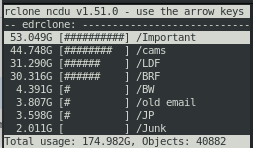
Run this command to see your new “God-mode” storage capacity: rclone size union1: --human-readable
Using it like a Hard Drive
You have two main ways to use this new space:
Option A: Mount as a Local Folder This makes the cloud feel like a USB drive plugged into your computer. rclone mount union1: ~/UnifiedCloud --vfs-cache-mode full
Option B: Serve as an S3 Bucket If you run apps like Nextcloud, Immich, or Jellyfin, you can serve your union as an S3-compatible endpoint: rclone serve s3 union1: --addr :9000 --auth-key YOUR_KEY,YOUR_SECRET --vfs-cache-mode full
Important Considerations
Before you go off and create 50 Gmail accounts, keep these “Ground Rules” in mind:
- The Power Source: The Union only exists while rclone is running. If you shut down your laptop, the drive “disconnects.”
- The Hardware: For 24/7 access (like a media server), it’s best to run this on a cheap VPS or a home server.
- Provider Limits: You are still subject to individual provider API limits. If you upload 750GB to Google Drive in one day, they will temporarily pause your uploads.
Final Thoughts: The Bigger Picture
In Interstellar, Cooper talks about looking up at the stars and wondering about our place among them. When you look at your terminal and see 100GB of “free” storage stitched together from five different providers, it feels a bit like that.
It’s not about “cheating” the system it’s about digital sovereignty. It’s about using open-source tools to reclaim your data from fragmented silos.
TL;DR:
- Install rclone.
- Connect multiple free cloud accounts.
- Create a “union” remote to merge them.
- Mount the union and enjoy your massive, free virtual drive.
The next time a friend complains about paying for storage, just smile and tell them: “There’s always room in the union.”